
Pokémon Bank is an important part of the history of Pokémon games. It was created for Nintendo 3DS systems and gave players a way to store Pokémon online and move them between supported games.
For players who have spent years building a Pokémon collection, Pokémon Bank can be especially important. Many older Pokémon can eventually be moved from Bank to Pokémon HOME, allowing players to keep their collections in the newer Pokémon ecosystem.
In this guide, we explain Pokémon Bank in simple English, including what it is, how it works, how transfers work, and what players should know before moving their Pokémon.
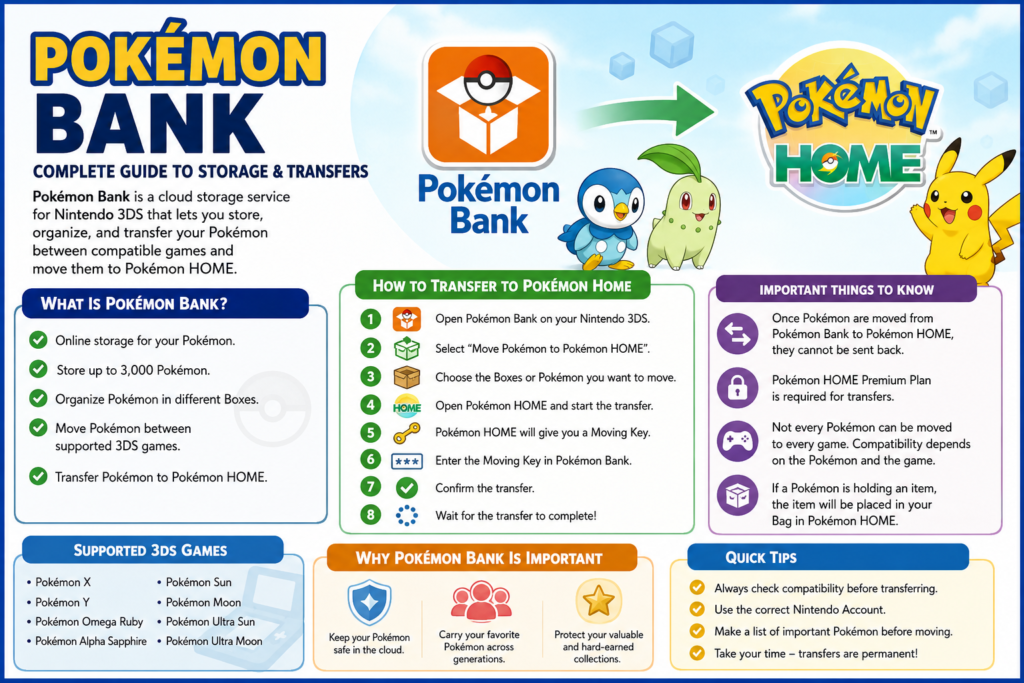
What Is Pokémon Bank?
Pokémon Bank is a Pokémon storage service made for the Nintendo 3DS family of systems.
Think of it as an online storage box for your Pokémon.
Instead of keeping every Pokémon inside one game, players could move compatible Pokémon into Pokémon Bank and organize them in different storage boxes.
This was useful for players who had large collections or played several Pokémon games.
Pokémon Bank also became an important way to move Pokémon from older games toward newer Pokémon titles.
Why Was Pokémon Bank Created?
As the number of Pokémon games grew, players wanted a simple way to keep their collections together.
A player might catch a rare Pokémon in one game and later want to use it in another game. Pokémon Bank helped make this possible when the games were compatible.
It also gave players more storage space than the normal boxes found inside individual Pokémon games.
For serious collectors, this made Pokémon Bank much more than a storage tool. It became a way to protect and carry a Pokémon collection from one generation to another.
Pokémon Bank and Pokémon HOME
Pokémon Bank and Pokémon HOME are different services.
Pokémon Bank was built around the Nintendo 3DS generation of Pokémon games. Pokémon HOME is the newer storage service used across supported modern Pokémon games and devices.
A simple way to understand the difference is:
Pokémon Bank = older 3DS Pokémon storage
Pokémon HOME = modern Pokémon storage
Pokémon HOME also provides a path for players who still have Pokémon in the older Bank system.
However, not every Pokémon can be moved into every Pokémon game. Compatibility depends on the Pokémon and the destination game.
Can Pokémon Bank Still Be Used?
Pokémon Bank is no longer a normal modern service that new players can simply purchase and set up through the Nintendo 3DS eShop.
The Nintendo 3DS eShop has closed, which changed how players access older 3DS software.
However, Pokémon Bank remains important for people who already have access to the application and have Pokémon stored there.
Official Pokémon Support continues to provide information about moving Pokémon from Bank to Pokémon HOME.
Because Nintendo 3DS services have changed over time, players should always check the latest official instructions before starting a transfer.
How to Move Pokémon From Bank to Pokémon HOME
Moving Pokémon from Bank to HOME is one of the most important reasons people still care about Pokémon Bank.
The exact steps depend on your equipment and account setup.
If you have a Nintendo 3DS, the transfer normally involves selecting Pokémon in Bank and then connecting the transfer process with Pokémon HOME.
Pokémon HOME uses a temporary Moving Key during the transfer process.
The key is only valid for a limited amount of time, so it is important to enter it correctly.
Basic Transfer Process
The general process looks like this:
- Open Pokémon Bank on your Nintendo 3DS.
- Select the option to move Pokémon to Pokémon HOME.
- Choose the Pokémon or Boxes you want to move.
- Open Pokémon HOME and start the transfer process.
- Follow the instructions shown by Pokémon HOME.
- Generate the Moving Key when requested.
- Enter the key into Pokémon Bank.
- Wait for the transfer to finish.
Before starting, make sure you are using the correct Nintendo Account and Pokémon HOME account.
Can You Transfer Pokémon Bank Without a 3DS?
This is an important question for people who no longer have their old Nintendo 3DS.
Pokémon Support provides a method for moving Pokémon from Bank to Pokémon HOME without physically using a Nintendo 3DS in certain account situations.
The process depends on the Nintendo Network ID and Nintendo Account connected to the Pokémon services.
There is also an important difference with this method: players should carefully check their Bank collection before starting because the transfer can move the Pokémon stored in Bank as part of the process.
If you no longer have your 3DS, checking your account information before attempting the transfer is especially important.
Do You Need Pokémon HOME Premium?
Yes.
A Pokémon HOME Premium Plan is required when transferring Pokémon from Pokémon Bank to Pokémon HOME.
This is different from Nintendo Switch Online.
Having Nintendo Switch Online does not automatically give you the Premium features needed for a Bank-to-HOME transfer.
If you plan to move an old Pokémon collection from Bank, check the current Pokémon HOME subscription requirements before starting.
Can Pokémon Go Back From HOME to Bank?
No.
This is one of the most important things to remember.
A Pokémon transferred from Pokémon Bank to Pokémon HOME cannot be sent back to Pokémon Bank.
The transfer should therefore be treated as a one-way move.
If you have rare Pokémon, shiny Pokémon, event Pokémon, or Pokémon with sentimental value, take your time before confirming the transfer.
Can Every Pokémon Be Moved to Every Game?
No.
This is another common misunderstanding about Pokémon HOME.
Moving a Pokémon into HOME does not mean that Pokémon can automatically be moved into every Pokémon game.
Different games support different Pokémon, forms, moves, and features.
Because of this, a Pokémon may remain safely stored in HOME even when it cannot currently be moved into a particular game.
Before planning a team, check whether the Pokémon is compatible with the game you want to use.
What Happens to Held Items?
Players should also remember that Pokémon and held items are handled differently during transfers.
If a Pokémon is carrying an item, the Pokémon can still be moved in supported situations, but the item does not travel with the Pokémon as a held item.
This is something to check before moving an important collection.
If you have valuable items connected to your Pokémon, make sure you understand what happens to them before confirming a transfer.
Why Pokémon Bank Is Important for Collectors
For many players, Pokémon are more than characters in a video game.
A collection may contain Pokémon that took hundreds of hours to obtain.
Some players have:
- Shiny Pokémon
- Event Pokémon
- Competitive Pokémon
- Pokémon caught many years ago
- Pokémon received from friends
- Pokémon from older generations
- Special Pokémon with personal memories
Losing access to such a collection can be frustrating.
Pokémon Bank gave players a way to keep many of these Pokémon together instead of leaving them inside one game.
For this reason, Bank became especially valuable to long-time Pokémon fans.
Pokémon Bank for Older Pokémon Collections
One of the biggest advantages of Pokémon Bank was its connection with older Pokémon games.
Players could gradually move Pokémon forward as the Pokémon series changed.
A Pokémon could begin its journey in an older game and, if supported, eventually reach a newer generation.
This made Pokémon Bank an important bridge between different generations of the franchise.
For collectors, that history is part of what makes old Pokémon valuable.
What Should You Check Before a Transfer?
If you still have Pokémon stored in Bank, do not rush the transfer.
First, make a list of your most important Pokémon.
Look for:
- Shiny Pokémon
- Rare event Pokémon
- Pokémon with special moves
- Pokémon with important memories
- Pokémon you want to use in a specific game
- Pokémon that may have special forms
- Pokémon you have not seen for many years
Then check their compatibility with Pokémon HOME and your intended destination game.
Most importantly, remember that a Bank-to-HOME transfer is not reversible.
What If Your Pokémon Bank Subscription Expired?
If you previously used Pokémon Bank but your subscription expired, you should check the current official Pokémon Support instructions before assuming that your collection is gone.
Pokémon Support has provided information for accessing Pokémon stored in Bank after a subscription expires.
The process and available options can depend on your account and the current state of the service.
If you have not checked your old Pokémon collection for years, it is worth verifying the situation before making any decisions.
Pokémon Bank vs Pokémon HOME
Here is a simple comparison:
| Feature | Pokémon Bank | Pokémon HOME |
|---|---|---|
| Main purpose | Pokémon storage and transfers | Modern Pokémon storage |
| Nintendo 3DS support | Yes | Connected through Bank |
| Modern Pokémon ecosystem | Limited/legacy | Designed for modern games |
| Large Pokémon collection | Yes | Yes |
| Bank transfer | N/A | Receives Pokémon from Bank |
| Return from HOME to Bank | Not applicable | No |
| Best for | Older Pokémon collections | Current Pokémon storage |
The biggest difference is the generation of Pokémon games they were designed to support.
Is Pokémon Bank Still Useful?
For someone starting a brand-new Pokémon collection today, Pokémon HOME is generally the more relevant service.
But if you played Pokémon games on Nintendo 3DS and still have Pokémon stored in Bank, the service remains important.
Your old Pokémon may represent years of playing, trading, collecting, and special events.
For those players, understanding how Bank connects with HOME can help protect their collection.
Common Pokémon Bank Questions
Is Pokémon Bank free?
Pokémon Bank’s current status is different from when it operated as a regular paid service. Because Nintendo 3DS services have changed, check the latest official Pokémon information for the current situation.
Can Pokémon Bank connect to Pokémon HOME?
Yes. Pokémon Bank was designed to work with Pokémon HOME for transferring eligible Pokémon into the newer service.
Can I transfer Pokémon from Bank back to an old 3DS game?
Pokémon Bank and its supported games have specific transfer rules. A Bank-to-HOME transfer is one-way, so Pokémon moved into HOME cannot be returned to Bank.
Do I need Pokémon HOME Premium to transfer Pokémon from Bank?
Yes. Pokémon HOME Premium is required for Bank-to-HOME transfers.
Can I move every Pokémon into Pokémon HOME?
The transfer system has compatibility rules. Some Pokémon may have restrictions depending on their origin and destination.
Is Pokémon HOME better than Pokémon Bank?
They serve different generations of Pokémon games. HOME is the modern storage platform, while Bank is mainly important for players with older 3DS Pokémon collections.
Final Thoughts
Pokémon Bank played an important role in helping players manage their Pokémon collections during the Nintendo 3DS era.
Even though Pokémon HOME is now the main modern storage service, Pokémon Bank remains important for players who have Pokémon from older games.
If you still have Pokémon stored in Bank, the most important thing is to understand the transfer process before doing anything.
Remember these three points:
First, Pokémon HOME is the modern successor to Bank.
Second, a Bank-to-HOME transfer is a one-way move.
Third, not every Pokémon can automatically move into every Pokémon game.
For longtime Pokémon players, moving an old collection to Pokémon HOME can be a useful way to keep years of Pokémon memories together for the future.
